In a previous blog post, we proved that running a 7B parameter LLM on z/OS was possible. It was a milestone, but performance made it more of a curiosity than a real thing. The real question was no longer whether it could run, but whether it could solve a problem worth solving. On z/OS, that doesn’t always mean generating text. Often, it means retrieving the right context at the right moment like helping system admins triage the thousands of messages streaming across the console and surface the ones that actually matter.
That makes Retrieval-Augmented Generation (RAG) a great fit for z/OS. It works within the platform’s performance limits and respects air-gapped environments. By indexing data locally using efficient embedding models, we can achieve fast semantic search results, turning a slow “curiosity” into a practical, real-time RAG tool.
This blog introduces z-vector-search, a native and open source z/OS engine that allows you to index and query your own data locally. It is also available as a library, so you can embed the same retrieval pipeline directly into your own applications. No cloud dependencies, no data leaving the LPAR, and no more manual flipping through IBM manuals. It’s about building RAG directly where the data lives. It’s also worth noting that much of the code for the project, including a substantial part of the work needed to get llama.cpp embedding support running cleanly on z/OS, was written with the help of IBM Bob, IBM’s AI Coding Assistant.
The scenario that motivated all of this is simple: a z/OS system programmer staring at a console flooded with messages like ABENDs, RACF violations, dataset allocation errors, trying to figure out which ones matter, what they mean, and whether the system has seen anything like this before. Today that means flipping between IBM message manuals, internal runbooks, and ticket histories. What if you could just ask? And what if the answer came from directly on z/OS, not by shipping log data to a cloud LLM, but right there on the LPAR where the data already lives?
This blog covers how we built z-vector-search, the technical decisions behind it, and how z-console, an operator console enrichment tool, serves as one prototype application built on top of it.
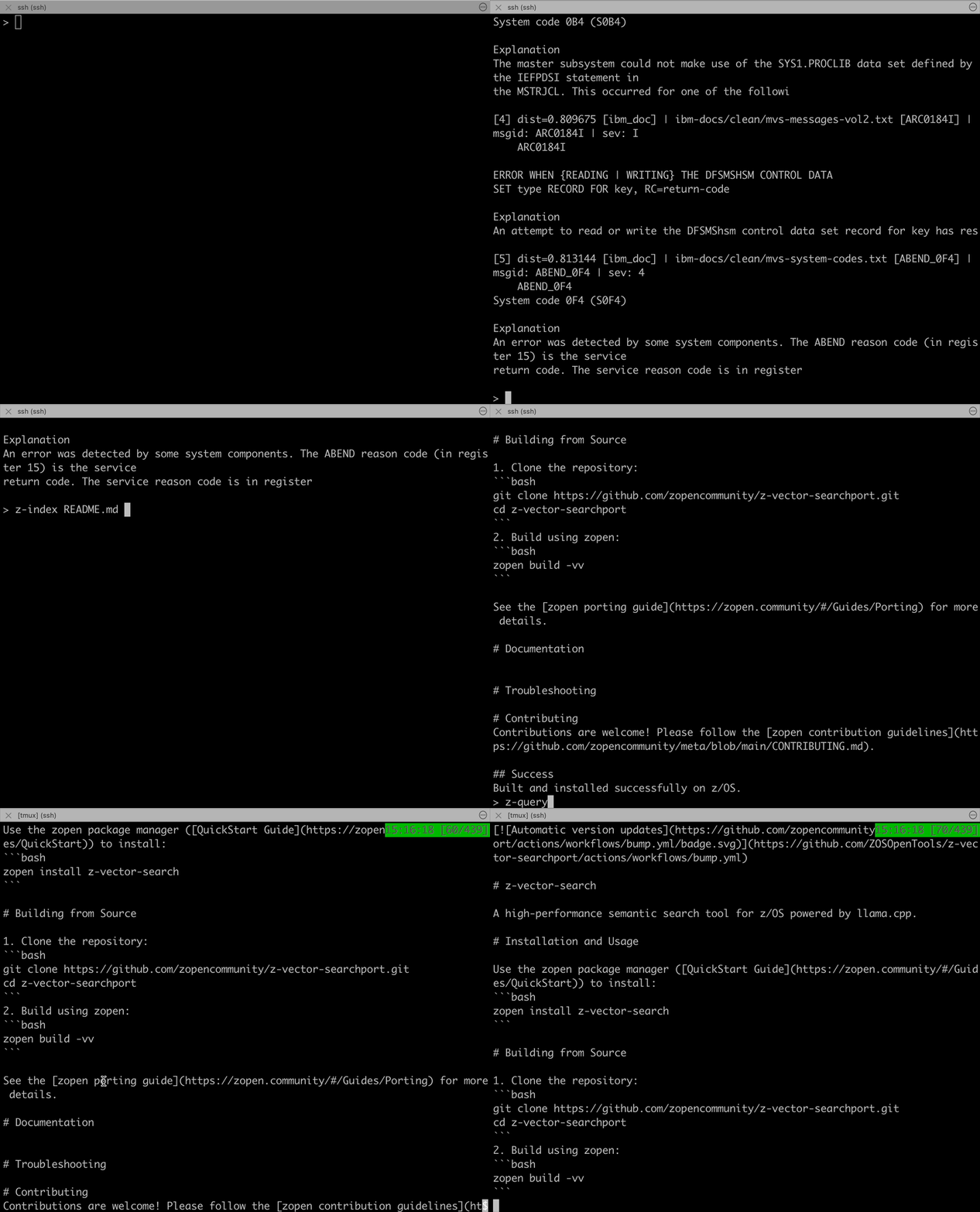 z-vector-search running directly on z/OS
Building a RAG system for z/OS
If you’re interested in using the tools and less about learning, go to the Getting Started section.
What RAG Means on z/OS
For a lot of enterprise systems, the missing piece is not generation, it is retrieval. The useful context already exists, but it is scattered across message manuals, procedures, runbooks, ticket histories, and operational logs. A local retrieval engine turns that fragmented knowledge into something you can actually search with natural language, exact identifiers, or a mix of both.
That is the role of z-vector-search. It provides the retrieval layer for on-prem RAG on z/OS: index data locally, search it locally, and return grounded context locally. You can then use that context directly in a CLI, inside an application, or as input to a later generation step. But if retrieval cannot happen securely on the platform where the data lives, the rest of the RAG pipeline is mostly academic.
The RAG idea actually came from a llama.cpp discussion thread about adding embedding model support. Reading through it, I realized that all the pieces I needed to build a z/OS RAG system were already on the table, I just had to wire them up.
But “wiring it up” was only possible because of the stable foundation provided by the zopen llamacpp port. That port was a true community effort, driven by a dedicated group of volunteers and university students who worked tirelessly to bring modern AI tools to the mainframe. Their contributions to the core infrastructure and math optimizations are what allowed us to reach this point.
What’s an embedding, anyway?
If you’ve never worked with them, embeddings are the trick that makes “semantic search” possible. An embedding model takes a piece of text and turns it into a list of numbers, a vector, that captures its meaning. The clever part is that two pieces of text with similar meanings produce vectors that are mathematically close to each other in space, even if they share no words in common.
That means a search for "dataset allocation failure" can find a document that says "IEC070I", because both phrases live near each other in vector space. No keyword matching, no synonyms list, no manual rules. The model has already learned what things mean.
To do search with embeddings, you embed every document once and store the vectors. At query time, you embed the query the same way and find the documents whose vectors are nearest yours.
The Model
The model I chose was Nomic Embed Text v1.5. Quantized to Q4_K_M, it’s just ~84 MB, small enough to run comfortably on z/OS, and well-regarded for retrieval tasks. It’s an encoder-only model (think BERT-style), which means it’s purpose-built for turning text into vectors rather than generating new text.
What It Took to Get Working
llama.cpp’s embedding support is newer than its text generation support, so a few things needed attention to make it behave on z/OS. A substantial part of this implementation work was done with IBM Bob:
-
Encoder model code path. Encoder-only models like Nomic take a different route through llama.cpp than decoder models like LLaMa. They produce one vector per input rather than streaming tokens, which means a different API (
llama_encode()instead ofllama_decode()) and slightly different batch handling. -
Pooling. The model produces a vector for every token, but you want a single vector per document. Nomic expects MEAN pooling, averaging the per-token vectors together. Getting this wrong produces embeddings that look fine but retrieve nonsense.
-
Document and query prefixes. Nomic uses a clever convention where you prepend
search_document:to text you’re indexing andsearch_query:to text you’re searching for. This subtly nudges the model to put documents and queries in slightly different regions of the embedding space, which measurably improves retrieval quality. A simple trick, but it makes a real difference. -
The endianness problem, again! Just like with the original llama.cpp port, endianness came back to haunt me. Embedding vectors are arrays of 32-bit floats, and a database built on little-endian platforms needs every float byte-swapped before z/OS (big-endian) can read them. I added automatic endianness detection and a
--convert-endianflag to enable a high-performance hybrid workflow: you can seed your knowledge base on a fast Linux or macOS box (where indexing thousands of documents takes seconds) and then ship the.dbfile over to z/OS for production use. This gives you the best of both worlds: massive throughput for the initial data ingestion and secure, local semantic search where it matters most.
After working through these, I had embeddings producing sensible vectors on z/OS, and that was enough to start building something real.
Building the Search Engine
With embeddings now working on z/OS, the next step was obvious: build a persistent vector store so you could index documents once and query them repeatedly.
Storage: SQLite + sqlite-vec
I chose SQLite as the backend, extended with sqlite-vec for vector similarity search. The combination made it extremely simple: no database server to manage, no network dependencies, just a single .db file.
The schema stores each text chunk alongside its embedding and metadata.
Chunking
Large documents can’t be embedded as a single unit: encoder models have a token limit, and long texts lose detail when compressed into one vector. So documents are split into overlapping chunks, 256 tokens each, with 64 tokens of overlap between adjacent chunks. The overlap ensures context at chunk boundaries isn’t lost, and each chunk is independently embedded and stored.
The Tools
To make this process seamless, I created z-setup, a simple initialization tool. It handles the heavy lifting: unpacking the pre-built messages database, performing the necessary big-endian conversion for z/OS, and downloading the optimized Nomic embedding model.
The project is composed of a suite of command-line tools:
| Tool | Purpose |
|---|---|
z-index |
Index documents into the persistent vector store |
z-query |
Search the store with natural language queries |
z-vector-search |
One-shot mode: index and query without persistence |
A typical workflow:
1
2
3
4
5
# Index your documents
z-index *.txt

# Search with natural language
z-query "how do I recover from an IEC070I error"
The query returns the most semantically relevant chunks, ranked by similarity. If your runbook says “dataset allocation failure” and you search for “IEC070I error,” it still finds the right answer.
All tools support --json output for scripting, so you can pipe results into jq:
1
z-query --json "dataset allocation failure" | jq '.results[0].snippet'
Hybrid Search
Pure semantic search is powerful, but sometimes you know exactly what you’re looking for. If an operator sees ICH408I and wants to look it up, they don’t need semantic similarity, they need an exact match.
So z-query automatically classifies each query:
ICH408I→ keyword search (exact message ID via SQL LIKE)DFH*→ keyword search (wildcard)MSGID:IEF JOB:PAYROLL→ keyword search (structured prefix)why is my CICS transaction failing→ semantic search (natural language)ICH408I unauthorized access→ hybrid (both, merged)
When both modes run, results are merged using Reciprocal Rank Fusion (RRF), a technique for combining ranked lists without needing to normalize scores across different methods. The formula is simple:
1
score = Σ 1/(k + rank)    where k = 60
The IBM z/OS Messages Knowledge Base
A semantic search engine is only as good as its data. To make the tool immediately useful for z/OS operators, I built a pre-packaged knowledge base of 24,565 IBM z/OS messages, covering MVS and system abend/wait codes. Each entry includes the message ID, explanation, system action, and operator response.
The knowledge base ships as a ready-to-use SQLite database, so z-query can answer questions about IBM messages out of the box:
1
z-query "what does abend S0C4 mean"
This returns the relevant system code documentation explaining that S0C4 is a protection exception, typically caused by a program accessing storage it doesn’t own.
z-console: One Application on Top of the Engine
The IBM messages knowledge base makes z-query useful immediately, but it is only one way to use the engine. To show what a full application built on top of z-vector-search can look like, I also built z-console.
Built on top of z-vector-search, z-console brings the same retrieval pipeline directly to the operator console. It is the answer to the question from the intro: what if a z/OS operator could just ask about a console message?
It comes pre-packaged with the z-vector-search suite. It builds directly on the core z-vector-search engine, using it as a library to perform real-time semantic lookups.
The z/OS operator console is the nerve center of a mainframe system. Messages stream in constantly: job completions, security events, storage allocations, errors, abends. Experienced operators know what to look for, but the volume is overwhelming, and critical messages can be buried in the noise.
z-console reads your console messages and enriches each one with relevant context from both IBM documentation and your system’s own operational history, all by running z-vector-search under the hood.
How It Works
- Read, pulls messages from the z/OS SYSLOG via
pcon(an IBM ZOAU utility that reads the system log) - Filter, picks out high-value messages: abends (
IEF*), data errors (IEC*), RACF violations (ICH*), CICS (DFH*), DB2 (DSN*), MQ (CSQ*), and anything with action/error severity - Look up, for each interesting message, runs a two-phase search:
- Keyword against the IBM messages knowledge base, what does this message ID mean?
- Semantic against your operational history, have we seen something like this before?
- Display, presents everything with color-coded severity and ranked context
Input Modes
z-console has three ways to feed it messages:
1
2
3
4
5
6
7
8
9
10
# Single message, the simplest starting point
z-console "ICH408I USER(BATCH1) GROUP(PROD) LOGON/JOB INITIATION - ACCESS REVOKED"

# Live console via pcon
z-console --pcon -l                    # last hour
z-console --pcon -t 30                 # last 30 minutes
z-console --since 2026-04-06T10:00     # since a specific timestamp

# Pipe from stdin
cat syslog.txt | z-console
Example Output
Running z-console --pcon -l on a system with an access violation might produce:
1
2
3
4
5
6
7
8
9
10
11
12
13
14
15
16
17
18
19
20
Parsed 847 messages, 23 interesting, 14 unique IDs to look up.

━━━ ICH408I (severity: E) ━━━
  ICH408I USER(BATCH1) GROUP(PROD) NAME(BATCH JOB)
    LOGON/JOB INITIATION - ACCESS REVOKED

  IBM Documentation (keyword match):
     ICH408I - A RACF-defined user has been revoked. The user's access
     authority has been removed, typically because consecutive incorrect
     password attempts exceeded the SETROPTS PASSWORD limit.
     System Action: The logon or job is rejected.
     Operator Response: Contact the security administrator to reinstate
     access via ALTUSER userid RESUME.
     (distance: 0.12)

  Operational History (semantic match):
     [2026-04-03 14:22] ICH408I,ICH409I, BATCH1 revoked on SYS1,
     resolved by security team reset. Related: RACF password policy
     change ticket INC-4421.
     (distance: 0.31)
In a single glance, the operator knows what the message means and that it’s happened before, with a pointer to how it was resolved last time. That’s the whole pitch for RAG on the console.
Building Operational History
To power the “have we seen this before?” lookups, there’s a companion tool called z-ingest-console. It runs as a background daemon via z-console-daemon.sh (every 5 minutes by default) and continuously indexes console messages into the vector store:
1
2
# Start the daemon in the background
nohup ./z-console-daemon.sh &
Messages are grouped into 5-minute time windows and stored with structured metadata, message IDs, highest severity, jobname, system name, timestamps. The longer it runs, the more historical context z-console can draw on.
The Full Picture: Enabling RAG Directly on z/OS
By bringing together embeddings, a persistent vector store, and a hybrid search engine, z-vector-search provides the retrieval core for a complete Retrieval-Augmented Generation (RAG) workflow that works directly on z/OS.
For the air-gapped environments common in finance and healthcare, it means you can build assistants and retrieval-driven tools that understand your specific system configuration and historical data without a single byte leaving your secure LPAR.
Here is the general pipeline that z-vector-search implements, whether the caller is z-query, z-console, or your own embedded application:
1
2
3
4
5
6
7
8
9
10
11
12
13
14
15
16
17
Documents / Logs / Runbooks / Message KB
        ↓
   Tokenize (llama.cpp)
        ↓
   Chunk (256 tokens, 64 overlap)
        ↓
   Embed (Nomic Embed v1.5)
        ↓
   L2 Normalize
        ↓
   Store (SQLite + sqlite-vec)
        ↓
   Query → Classify → Keyword / Semantic / Hybrid
        ↓
   Reciprocal Rank Fusion
        ↓
   Top-K Results with Context
Everything runs locally on z/OS. No external API calls, no cloud dependencies, no data leaving the LPAR. The generation step, if you want one, can sit on top later. The important part is that the retrieval foundation already runs where the data lives.
The entire stack is pure C++17 with SQLite, sqlite-vec, and llama.cpp. No Python runtime, no Java, no external dependencies beyond what zopen provides.
Getting Started
Prerequisites: you’ll need the zopen package manager set up on your z/OS system. If you haven’t used zopen before, the QuickStart Guide takes about five minutes.
The simplest way to get going is straight from zopen:
1
zopen install z-vector-search
Then, regardless of how you installed:
1
2
3
4
5
6
7
8
9
10
11
12
13
14
15
16
17
# 3. Run setup, downloads the model and unpacks the IBM messages DB
z-setup

# 4. Query the IBM messages knowledge base
z-query "what does abend S0C4 mean"

# 5. Index your own runbooks or operational docs
z-index /path/to/runbooks/*.txt

# 6. Search them semantically
z-query "how do I recover from an IEC070I error"

# 7. Optional: look up a single console message
z-console "ICH408I USER(BATCH1) GROUP(PROD) LOGON/JOB INITIATION - ACCESS REVOKED"

# 8. Optional: read the last hour of live console
z-console --pcon -l
The source code is available on GitHub.
Conclusion
What started as “can we get embeddings working on z/OS?” turned into a practical retrieval layer for RAG on the mainframe. Embeddings gave us semantic understanding. A vector store made it persistent. Hybrid search made it practical for people who think in message IDs, commands, and procedures, not just natural language. z-console tied it into one concrete operator workflow, but the bigger point is that secure, local retrieval on z/OS is now a real building block you can use elsewhere too.
Thank you to Bill O’Farrell, Chad McIntyre, James Tang, Haritha D, and Sachin T for their support and feedback!
